How to create and set up the Nimblr administrators
1. First log in to your Nimblr administrator account at https://nimblr.net
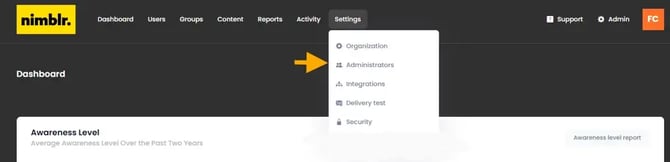
2. Go to Settings > Administrators
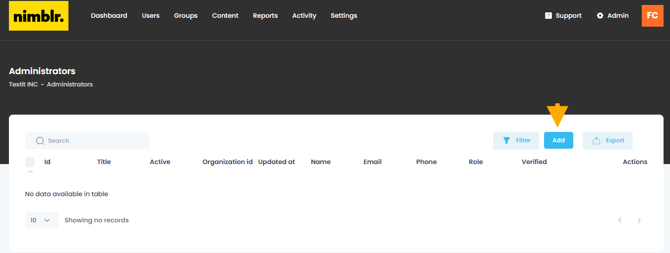
3. Select Add
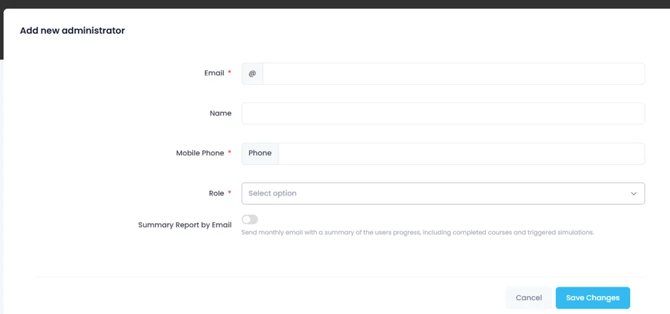
4. Fill in the account details of the Administrator you wish to add.
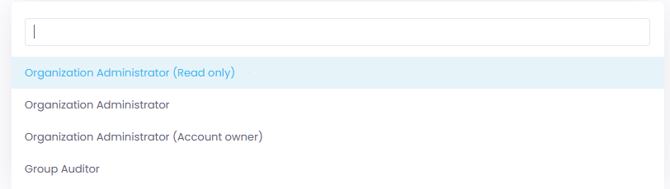
5. Choose the correct Role for your administrator.
Here is an explanation of the different roles and their scopes:
Organization Administrator (Account Owner) This role may access all reports and statistics and have the options to add administrators as well as users, delete and edit settings, groups.
Organization Administrator This role may access all reports and statistics and have the options to add, delete and edit settings, groups and users.
Organization Administrator (Read Only) This role may access all reports and statistics but have no option to change any settings, groups or users.
Group Auditor (Read Only) This role may access users report and user progress details limited to the scope based on one or more of the following user attributes: Group, Job title, Department, Location, Country, Company, Manager. Group auditors can be automatically generated from the integration with Microsoft Entra ID, based on the 'manager' attribute.